

Overview
berutu.dev is my portfolio + technical blog, built to help clients quickly verify two things:
- I can build product-facing web experiences
- I can deploy and operate them in production
This project is the public proof of that workflow.
Problem and Motivation
Before this project, there was no single place that could:
- present case studies in a professional format
- publish technical writing with a clean reading experience
- maintain dark/light mode for modern UX expectations
- run independently on a self-managed VPS
- demonstrate deployment and operations capability in public
For freelance and Upwork positioning, this created a trust gap.
Solution
I built a fast, content-first stack with Astro + MDX and deployed it on a self-managed VPS.
Core setup:
- Frontend/content: Astro, React, TypeScript, Tailwind CSS, MDX
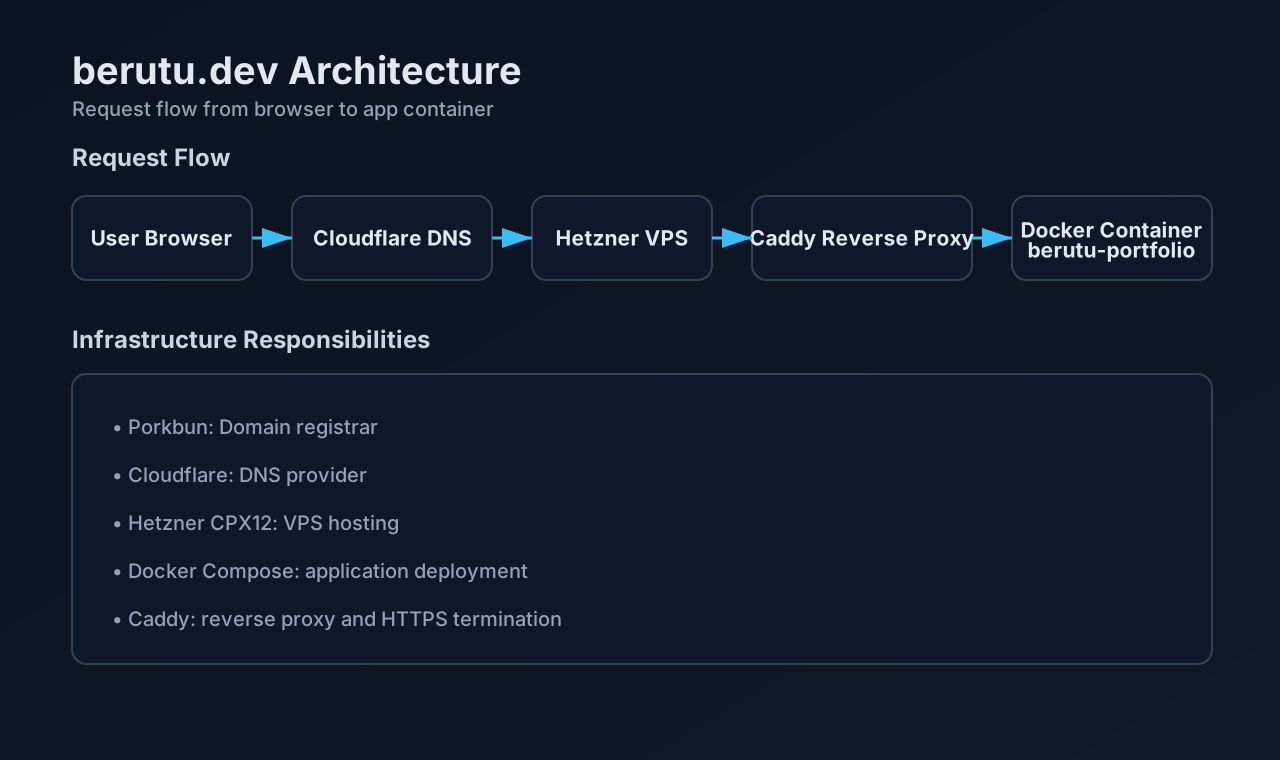
- Hosting: Hetzner CPX12 (Ubuntu)
- Deployment: Docker Compose
- Edge proxy + TLS: Caddy
- DNS: Cloudflare
Why this setup works:
- high content velocity (MDX-based publishing)
- strong frontend performance (Astro static output)
- reproducible infrastructure (Docker-based deployment)
- clean public traffic handling (single reverse proxy entrypoint)
Architecture
Implementation Highlights
1) Domain and DNS
- Purchased
berutu.devfrom Porkbun - Changed nameservers from Porkbun to Cloudflare
- Added DNS records:
A      @      -> 5.223.79.193
CNAME www -> berutu.dev- Used DNS-only mode for initial verification
2) VPS Provisioning
- Provider: Hetzner
- Plan: CPX12
- OS: Ubuntu
- User:
admin
3) Server Hardening
- Enabled UFW firewall
- Added 2GB swap for build/runtime stability
- Installed Docker Engine + Docker Compose plugin
4) Docker Deployment
- Created external Docker network:
web - Ran the portfolio as a dedicated container service
- Kept deployment reproducible across updates
5) Reverse Proxy with Caddy
- Main Caddy container exposes
80/443 - Portfolio app serves internal HTTP at
berutu-portfolio:80 - Caddy handles public routing + HTTPS
berutu.dev {
    reverse_proxy berutu-portfolio:80
}

www.berutu.dev {
    redir https://berutu.dev{uri}
}
6) Astro Production Build
- Build artifact is static output from Astro
- Runtime container serves static assets behind Caddy
- Result: simple operations + fast delivery
7) Troubleshooting: Node.js Version Mismatch
Initial Docker build failed because the image used Node.js 20 while Astro required a newer version.
Fix:
FROM node:22-alpine AS build8) Troubleshooting: Reverse Proxy Conflict
At first, a repo-level Caddyfile tried to terminate the public domain directly.
This conflicted with the VPS-level Caddy instance.
Resolution:
- Main Caddy is the only public-facing reverse proxy
- Portfolio container serves internal HTTP only
- Main Caddy proxies traffic to
berutu-portfolio:80
9) Troubleshooting: DNS Propagation Delay
During rollout, Cloudflare authoritative nameservers returned the correct IP, while some recursive resolvers still returned Porkbun parking IPs:
44.227.76.166
44.227.65.245
Validation commands:
dig @dimitris.ns.cloudflare.com A berutu.dev +short
dig @dora.ns.cloudflare.com A berutu.dev +short
curl -k -I --resolve berutu.dev:443:5.223.79.193 https://berutu.dev
Temporary local override while cache propagated:
5.223.79.193 berutu.dev www.berutu.dev10) Final Production Validation
docker exec caddy wget -qO- http://berutu-portfolio:80 | head
curl -k -I --resolve berutu.dev:443:5.223.79.193 https://berutu.dev
Expected response:
HTTP/2 200
server: Caddy
Key Learnings
- Separate registrar, DNS provider, and hosting responsibilities clearly
- Keep exactly one public-facing reverse proxy responsible for HTTPS
- Serve app containers over internal HTTP behind the reverse proxy
- Validate propagation via authoritative nameservers before assuming DNS is wrong
- Use Docker to keep deployment reproducible and easier to troubleshoot
- Use
/etc/hostsonly as a temporary local testing aid during propagation windows
Outcome
https://berutu.dev is live, stable, and production-ready.
Key outcomes:
- HTTPS works end-to-end through Caddy
- the site is served from a Docker container behind the reverse proxy
- deployment workflow is reproducible for future updates
- infrastructure is ready for future subdomains such as:
hkbp.berutu.devapi-hkbp.berutu.dev
This project demonstrates end-to-end delivery from domain setup to production operations.